- acroread - Read or print a PDF file.
- cat - Send a file to the screen in one go. Useful for piping to other programs
cat file1                       # list file1 to screen
cat file1 file2 file3 > outfile # add files together into outfile
cat *.txt > outfile             # add all .txt files together
cat file1 file2 | grep fred     # pipe files
- cc - Compile a C program
cc test1.c                     # compile test1.c to a.out
cc -O2 -o test2.prog test2.c   # compile test2.c to test2.prog
- cd - Change current directory
cd                     # go to home directory
cd ~/papers            # go to /home/user/papers
cd ~fred               # go to /home/fred
cd dir                 # go to directory (relative)
cd /dir1/dir2/dir3...  # go to directory (absolute)
cd -                   # go to last directory you were in
- cp - Copy file(s)
cp file1 file2                      # copy file1 to file2
cp file1 directory                  # copy file1 into directory
cp file1 file2 file3 ... directory  # copy files into directory
cp -R dir1 dir2/  # copy dir1 into dir2 including subdirectries
cp -pR dir1 dir2/ # copy directory, preserving permissions
- date - Shows current date
> date
Sat Aug 31 17:18:53 BST 2002
- dvips - Convert a dvi file to PostScript
dvips document.dvi        # convert document.dvi to document.ps
dvips -Ppdf document.dvi  # convert to ps, for conversion to pdf
- emacs - The ubiquitous text editor
emacs foo.txt # open file in emacs emacsclient foo.txt # open file in existing emacs (need to use # M-x start server first) - file - Tells you what sort of file it is
> file temp_70.jpg
temp_70.jpg: JPEG image data, JFIF standard 1.01,
resolution (DPI), 72 x 72
- firefox - Start Mozilla Firefox
- f77/f90 - Compile a Fortran 77/99 program
f77 -O2 -o testprog testprog.f
- gedit - Gnome text editor
- gnuplot - A plotting package.
- grep - Look for text in files. List out lines containing text (with filename if more than one file examined).
grep "hi there" file1 file2 ... # look for 'hi there' in files
grep -i "hi there" filename     # ignore capitals in search
cat filename | grep "hi there"  # use pipe
grep -v "foo" filename          # list lines that do not include foo
- gtar - GNU version of the tar utility (also called tar on Linux). Store directories and files together into a single archive file. Use the normal tar program to backup files to a tape. See info tar for documentation.
gtar cf out.tar dir1    # put contents of directory into out.tar
gtar czf out.tar.gz dir1 # write compressed tar, out.tar.gz
gtar tf in.tar          # list contents of in.tar
gtar tzf in.tar.gz      # list contents of compressed in.tar.gz
gtar xf in.tar          # extract contents of in.tar here
gtar xzf in.tar.gz      # extract compressed in.tar.gz
gtar xf in.tar file.txt ... # extract file.txt from in.tar
- gv - View a Postscript document with Ghostscript.
- gzip / gunzip - GNU Compress files into a smaller space, or decompress .Z or .gz files.
gzip file.fits          # compresses file.fits into file.fits.gz
gunzip file.fits.gz     # recovers original file.fits
gzip *.dat              # compresses all .dat files into .dat.gz
gunzip *.dat.gz         # decompresses all .dat.gz files into .dat
program | gzip > out.gz # compresses program output into out.gz
program | gunzip > out  # decompresses compressed program output
- info - A documentation system designed to replace man for GNU programs (e.g. gtar, gcc). Use cursor keys and return to go to sections. Press b to go back to previous section. A little hard to use.
info gtar # documentation for gtar
- kill - Kill, pause or continue a process. Can also be used for killing daemons.
> ps -u jss ... 666 pts/1 06:06:06 badprocess > kill 666 # this sends a ``nice'' kill to the # process. If that doesn't work do > kill -KILL 666 # (or equivalently) > kill -9 666 # which should really kill it! > kill -STOP 667 # pause (stop) process > kill -CONT 667 # unpause process - latex - Convert a tex file to dvi
- logout - Closes the current shell. Also try ``exit''.
- lp - Sends files to a printer
lp file.ps  # sends postscript file to the default printer
lp -dlp2 file.ps           # sends file to the printer lp2
lp -c file.ps    # copies file first, so you can delete it
lpstat -p lp2         # get status and list of jobs on lp2
cancel lp2-258                  # cancel print job lp2-258

lpr -Plp2 file.ps                    # send file.ps to lp2
lpq -Plp2                        # get list of jobs on lp2
lprm -Plp2 1234                   # delete job 1234 on lp2
- ls - Show lists of files or information on the files
ls file     # does the file exist?
ls -l file  # show information about the file
ls *.txt    # show all files ending in .txt
ls -lt      # show information about all files in date order
ls -lrt     # above reversed in order
ls -a       # show all files including hidden files
ls dir      # show contents of directory
ls -d dir   # does the directory exist?
ls -p       # adds meaning characters to ends of filenames
ls -R       # show files also in subdirectories of directory
ls -1       # show one file per line
- man - Get instructions for a particular Unix command or a bit of Unix. Use space to get next page and q to exit.
man man      # get help on man
man grep     # get help on grep
man -s1 sort # show documentation on sort in section 1
- more - Show a file one screen at a time
more file                # show file one screen at a time
grep 'frog' file | more  # Do it to output of other command
- mv - Move file(s) or rename a file
mv file1 file2                     # rename file1 to file2
mv dir1 dir2                       # rename directory dir1 to dir2
mv file1 file2 file3 ... directory # move files into directory
- nano - very simple text editor. Warning - this program can introduce extra line breaks in your file if the screen is too narrow!
- nice - Start a process in a nice way. Nice levels run from -19 (high priority) to 19 (low priority). Jobs with a higher priority get more CPU time. See renice for more detail. You should probably be using the grid-engine to run long jobs.
nice +19 myjob1   # run at lowest priority
nice +8 myjob2    # run at lowish priority
- openoffice.org - a free office suite available for Linux/Unix, Windows and Mac OS X.
- passwd - change your password
- pine - A commonly used text-based mail client. It is now called alpine. Allows you to send and receive emails. Configuration options allow it to become quite powerful. Other alternatives for mail are mozilla mail and mutt, however I suggest you stick to alpine or thunderbird.
- printenv - Print an environment variable in tcsh
setenv MYVARIABLE Fred
printenv MYVARIABLE
printenv # print all variables
- ps - List processes on system
> ps -u jss          # list jss's processes
  934 pts/0    00:00:00 bash
^^^^^ ^^^^^    ^^^^^^^^ ^^^^^^^
PID   output   CPU time name
> ps -f      # list processes started here in full format
> ps -AF     # list all processes in extra full format
> ps -A -l            # list all processes in long format
> ps -A | grep tcsh   # list all tcsh processes
- pwd - Show current working directory
> pwd
/home/jss/writing/lecture
- quota - Shows you how much disk space you have left
> quota -v
...
- renice - Renice a running process. Make a process interact better with other processes on the system (see top to see how it is doing). Nice levels run from -19 (high priority) to 19 (low priority). Only your own processes can be niced and they can only be niced in the positive direction (unless you are root). Normal processes start at nice 0.
> ps -u jss | grep bigprocess      # look for bigprocess
 1234 pts/0    99:00:00 bigprocess
> renice 19 1234                   # renice PID 1234 to 19
- rm - Delete (remove) files
rm file1     # delete a file (use -i to ask whether sure)
rm -r dir1   # delete a directory and everything in it (CARE!)
rm -rf dir1  # like above, but don't ask if we have a -i alias
- rmdir - Delete a directory if it is empty (rm -r dirname is useful if it is not empty)
rmdir dirname
- staroffice - An office suite providing word processor, spreadsheet, drawing package. See Users' Guide on how to install this. This is a commercial version of the openoffice office package - useopenoffice.org on linux.
- setenv - Set an environment variable in tcsh.
setenv MYVARIABLE Fred
echo Hi there $MYVARIABLE
- tar - Combine files into one larger archive file, or extract files from that archive (same as gtar on Linux).
tar cvf /dev/rmt/0 ./      # backup cwd into tape
tar tvf /dev/rmt/0         # list contents of tape
tar xvf /dev/rmt/0         # extract contents of tape
- thunderbird - Start mozilla thunderbird.
- top - Interactively show you the ``top'' processes on a system - the ones consuming the most computing (CPU) time. Press the ``q'' key in top to exit. Press the ``k'' key to kill a particular process. Press ``r'' to renice a process.

Wednesday, December 26, 2012
Basic Shell Commands
A shell script is a script written for the shell, or command line interpreter, of an operating system. The shell is often considered a simple domain-specific programming language.Typical operations performed by shell scripts include file manipulation, program execution, and printing text.


Friday, December 21, 2012
Difference between TRUNCATE, DELETE and DROP commands
DELETE
The DELETE command is used to remove rows from a table. A WHERE clause can be used to only remove some rows. If no WHERE condition is specified, all rows will be removed. After performing a DELETE operation you need to COMMIT or ROLLBACK the transaction to make the change permanent or to undo it. Note that this operation will cause all DELETE triggers on the table to fire.
SQL> SELECT COUNT(*) FROM emp;

  COUNT(*)
----------
        14

SQL> DELETE FROM emp WHERE job = 'CLERK';

4 rows deleted.

SQL> COMMIT;

Commit complete.

SQL> SELECT COUNT(*) FROM emp;

  COUNT(*)
----------
        10
TRUNCATE
TRUNCATE removes all rows from a table. The operation cannot be rolled back and no triggers will be fired. As such, TRUCATE is faster and doesn't use as much undo space as a DELETE.
SQL> TRUNCATE TABLE emp;

Table truncated.

SQL> SELECT COUNT(*) FROM emp;

  COUNT(*)
----------
         0
DROP
The DROP command removes a table from the database. All the tables' rows, indexes and privileges will also be removed. No DML triggers will be fired. The operation cannot be rolled back.
SQL> DROP TABLE emp;

Table dropped.

SQL> SELECT * FROM emp;
SELECT * FROM emp
              *
ERROR at line 1:
ORA-00942: table or view does not exist
DROP and TRUNCATE are DDL commands, whereas DELETE is a DML command. Therefore DELETE operations can be rolled back (undone), while DROP and TRUNCATE operations cannot be rolled back.
From Oracle 10g a table can be "undropped". Example:
SQL> FLASHBACK TABLE emp TO BEFORE DROP;

Flashback complete.
PS: DROP and TRUNCATE are DDL commands, whereas DELETE is a DML command. As such, DELETE operations can be rolled back (undone), while DROP and TRUNCATE operations cannot be rolled back.
Tuesday, December 18, 2012
Database Triggers
A database triggers is stored PL/SQL program unit associated with a specific database table or view. The code in the trigger defines the action the database needs to perform whenever some database manipulation (INSERT, UPDATE, DELETE) takes place.
Unlike the stored procedure and functions, which have to be called explicitly, the database triggers are fires (executed) or called implicitly whenever the table is affected by any of the above said DML operations.
Till oracle 7.0 only 12 triggers could be associated with a given table, but in higher versions of Oracle there is no such limitation. A database trigger fires with the privileges of owner not that of user
A database trigger has three parts
- A triggering event
- A trigger constraint (Optional)
- Trigger action
A triggering event can be an insert, update, or delete statement or a instance shutdown or startup etc. The trigger fires automatically when any of these events occur A trigger constraint specifies a Boolean expression that must be true for the trigger to fire. This condition is specified using the WHEN clause. The trigger action is a procedure that contains the code to be executed when the trigger fires.
Types of Triggers
The following are the different types of triggers.
Row triggers and statement triggers
A Row trigger fires once for each row affected. It uses FOR EACH ROW clause. They are useful if trigger action depends on number of rows affected.
Statement Trigger fires once, irrespective of number of rows affected in the table. Statement triggers are useful when triggers action does not depend on
Before and afterTriggers
While defining the trigger we can specify whether to perform the trigger action (i.e. execute trigger body) before or after the triggering statement. BEFORE and AFTER triggers fired by DML statements can only be defined on tables.
BEFORE triggers The trigger action here is run before the trigger statement.
AFTER triggers The trigger action here is run after the trigger statement.
INSTEAD of Triggers provide a way of modifying views that can not be modified directly using DML statements.
LOGON triggers fires after successful logon by the user and LOGOFF trigger fires at the start of user logoff.
Points to ponder
- A trigger cannot include COMMIT, SAVEPOINT and ROLLBACK.
- We can use only one trigger of a particular type .
- A table can have any number of triggers.
- We use correlation names :new and :old can be used to refer to data in command line and data in table respectively.
Triggers on DDL statements
DDL trigger are of the following types
BEFORE CREATE OR AFTER CREATE trigger is fired when a schema object is created.
BEFORE OR AFTER ALTER trigger is fired when a schema object is altered.
BEFORE OR AFTER DROP trigger is fired when a schema object is dropped.
BEFORE OR AFTER ALTER trigger is fired when a schema object is altered.
BEFORE OR AFTER DROP trigger is fired when a schema object is dropped.
A trigger can be enabled means can be made to run or it can disabled means it cannot run. A trigger is automatically enabled when it is created. We need re-enable trigger for using it if it is disabled. To enable or disable a trigger using ALTER TRIGGER command, you must be owner of the trigger or should have ALTER ANY TRIGGER privilege. To create a trigger you must have CREATE TRIGGER privilege, which is given to as part of RESOURCE privilege at the time of user creation.
Following figures give more understanding about triggers

Oracle Control Structures
This tutorial teaches about how to structure flow of control through a PL/SQL program. The control structures of PL/SQL are simple yet powerful. Control structures in PL/SQL can be divided into selection or conditional, iterative and sequential.

Example:


LOOP
BEGIN

 WHILE-LOOP

FOR


The GOTO statement is used for doing unconditional branching to a named label. Its frequent usage is not recommended. We should have at least one executable statement following the label. GOTO statements can some time result in complex, unstructured code making it difficult to understand.
Control Structures
This chapter teaches about how to structure flow of control through a PL/SQL program. The control structures of PL/SQL are simple yet powerful. Control structures in PL/SQL can be divided into selection or conditional, iterative and sequential.
Conditional Control (Selection): This structure tests a condition, depending on the condition is true or false it decides the sequence of statements to be executed. Example
IF-THEN, CASE and searched CASE statements.
Syntax for IF-THEN
IF
Statements
END IF;
Example:
This chapter teaches about how to structure flow of control through a PL/SQL program. The control structures of PL/SQL are simple yet powerful. Control structures in PL/SQL can be divided into selection or conditional, iterative and sequential.
Conditional Control (Selection): This structure tests a condition, depending on the condition is true or false it decides the sequence of statements to be executed. Example
IF-THEN, CASE and searched CASE statements.
Syntax for IF-THEN
IF
Statements
END IF;
Example:
IF-THEN-ELSE:
IF
Statements
ELSE
statements
END IF;
Example:
IF-THEN-ELSIF:
IF
IF
Statements
ELSIF
Statements
ELSE
Statements
END IF;
Iterative Control
LOOP statement executes the body statements multiple times. The statements are placed between LOOP – END LOOP keywords.
The simplest form of LOOP statement is an infinite loop. EXIT statement is used inside LOOP to terminate it.
Syntax for LOOP- END LOOP
LOOP
Statements
END LOOP;
Example:
BEGIN
LOOP
DBMS_OUTPUT.PUT_LINE (‘Hello’);
END LOOP;
END;
Ads
Labeling Loops
We can label Loops. A Label is undeclared identifier enclosed between double angle brackets( Ex. <
We can label Loops. A Label is undeclared identifier enclosed between double angle brackets( Ex. <
WHILE-LOOP
This is similar to LOOP. A condition placed between WHILE and LOOP is evaluated before each iteration. If the condition evaluates to TRUE the statements are executed and the control resumes at the top of the LOOP. If the condition evaluates to FALSE or NULL then control comes out of the loop.
at the top of the LOOP. If the condition evaluates to FALSE or NULL then control comes out of the loop.
FOR – LOOP:
The FOR – LOOP is used to repeatedly execute a set of statements for certain number of times specified by a starting number and an ending number. The variable value starts at the starting value given and increments by 1(default and can not be changed) with each iteration. The iteration stops when the variable value reaches end value specified.
Syntax:
FOR
LOOP
Statements
END LOOP;
Sequential Control Statements
The GOTO statement is used for doing unconditional branching to a named label. Its frequent usage is not recommended. We should have at least one executable statement following the label. GOTO statements can some time result in complex, unstructured code making it difficult to understand.
Points To be remembered while working with GOTO:
- A statement, at least NULL statement, must follow every GOTO statement
- A GOTO statement can branch to enclosing block from the current block
- A GOTO statement cannot branch from one IF statement clause to another.
- A GOTO statement cannot branch from an enclosing block into a sub-block.
- A GOTO statement cannot branch out of a subprogram.
- A GOTO cannot branch from an exception handler to current block. But it can branch from the exception handler to an enclosing block
Monday, December 17, 2012
Useful Command Prompt Commands
1. ipconfig :
This is the top most command for seeing the ip address,subnet mask and default gateway also includes display and flush DNS cache, re-register the system name in DNS.. This will most useful tool for viewing and troubleshooting TCP/IP problem.

2.systeminfo
Have a need to display operating system configuration information for a local or remote machine, including service pack levels? Then systeminfo is the tool to use. When I need to connect to a system that I am not familiar with, this is the first tool I run. The output of this command gives me all the info I need including: host name, OS type, version, product ID, install date, boot time and hardware info (processor and memory). Also knowing what hot fixes are installed can be a big help when troubleshooting problems. This tool can be used to connect to a machine remotely using the following syntax: SYSTEMINFO /S system /U user

3. tasklist and taskkill
If you work with Task Manager (ctrl+alt+del) ,you can easily understand this. Task list is list of task which are running on windows currently. If you open any application,it will be added to task.
To List the Tasks type in cmd as :

To stop the Process or task ,there is two methods :
Using Image Name:
We can kill the task using its Image Name as follows:

Using Process Id:
we can stop the process using its process id as follows :

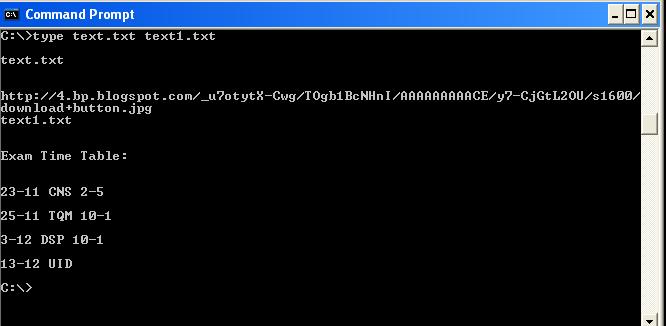
4. type
type is used to read the text document in command prompt . You can read multiple text in continuously

5.netstat
Need to know who (or what) is making a connection to your computer? Then netstat is the tool you want to run. The output provides valuable information of all connections and listening ports, including the executable used in the connections. In additon to the above info, you can view Ethernet statistics, and resolve connecting host IP Addresses to a fully qualified domain name. I usually run the netstat command using the -a (displays all connection info), -n (sorts in numerical form) and -b (displays executable name) switches.

This is the top most command for seeing the ip address,subnet mask and default gateway also includes display and flush DNS cache, re-register the system name in DNS.. This will most useful tool for viewing and troubleshooting TCP/IP problem.

- To view ip ,subnet mask address : ipconfig
- To view all TCP/IP information, use: ipconfig /all
- To view the local DNS cache, use: ipconfig /displaydns
- To delete the contents in the local DNS cache, use: ipconfig /flushdns
2.systeminfo
Have a need to display operating system configuration information for a local or remote machine, including service pack levels? Then systeminfo is the tool to use. When I need to connect to a system that I am not familiar with, this is the first tool I run. The output of this command gives me all the info I need including: host name, OS type, version, product ID, install date, boot time and hardware info (processor and memory). Also knowing what hot fixes are installed can be a big help when troubleshooting problems. This tool can be used to connect to a machine remotely using the following syntax: SYSTEMINFO /S system /U user

3. tasklist and taskkill
If you work with Task Manager (ctrl+alt+del) ,you can easily understand this. Task list is list of task which are running on windows currently. If you open any application,it will be added to task.
To List the Tasks type in cmd as :
tasklistThis will show the list of task which are running as shown in the picture

To stop the Process or task ,there is two methods :
Using Image Name:
We can kill the task using its Image Name as follows:
tasklist /im notepad.exe

Using Process Id:
we can stop the process using its process id as follows :
tasklist /pid 1852

4. type
type is used to read the text document in command prompt . You can read multiple text in continuously
type filename.txt
5.netstat
Need to know who (or what) is making a connection to your computer? Then netstat is the tool you want to run. The output provides valuable information of all connections and listening ports, including the executable used in the connections. In additon to the above info, you can view Ethernet statistics, and resolve connecting host IP Addresses to a fully qualified domain name. I usually run the netstat command using the -a (displays all connection info), -n (sorts in numerical form) and -b (displays executable name) switches.
How to kill a task Using Command Prompt
To view the tasks running
Type : tasklist in Command prompt
To find the task
Type : tasklist | findstr taskname in Command prompt
Ex: tasklist | findstr chrome
to kill a task
Type taskkill /pid pidnumber /f
Ex: taskkill /pid 1222 /f
Type : tasklist in Command prompt
To find the task
Type : tasklist | findstr taskname in Command prompt
Ex: tasklist | findstr chrome
to kill a task
Type taskkill /pid pidnumber /f
Ex: taskkill /pid 1222 /f
Tuesday, November 6, 2012
SAP - "System Application & Products"
A SAP system is divided into modules like MM, SD which maps business process of that particular department or business unit.
Following is the list of module available in SAP system.
- SAP FI Module- FI stands for Financial Accounting
- SAP CO Module- CO stands for Controlling
- SAP PS Module – and PS is Project Systems
- SAP HR Module – HR stands for Human Resources
- SAP PM Module – where Plant Maintenance is the PM
- SAP MM Module – MM is Materials Management -
- SAP QM Module - QM stands for Quality Management
- SAP PP Module – PP is Production Planning
- SAP SD Module – SD is Sales and Distribution
- SAP BW Module – where BW stands for Business (Data) Warehouse
- SAP EC Module – where EC stands for Enterprise Controlling
- SAP TR Module – where TR stands for Treasury
- SAP IM Module – whre IM stands for Investment Management
- SAP QM Module – where QM stands for Quality Management
- SAP – IS where IS stands for Industries specific solution
- SAP – Basis
- SAP – ABAP
- SAP – Cross Application Components
- SAP – CRM where CRM stands for Customer Relationship Management
- SAP – SCM where SCM stands for Supply Chain Management
- SAP – PLM where PLM stands for Product LifeCycle Management
- SAP – SRM where SRM stands for Supplier Relationship Management
- SAP – CS where CS stands for Customer Service
- SAP – SEM where SEM stands for STRATEGIC ENTERPRISE MANAGEMENT
- SAP – RE where RE stands for Real Estate
SAP stands for Systems Applications and Products in Data Processing.
It was Founded in 1972 by Wellenreuther, Hopp, Hector, Plattner and Tschira.
SAP by definition also name of the ERP (Enterprise Resource Planing) software as well the name of the company.
SAP system comprises of a number of fully integrated modules, which covers virtually every aspect of the business management.
SAP is #1 in the ERP market .As of 2010, SAP has more than 140,000 installations worldwide ,over 25 industry-specific business solutions, and more than 75,000 customers in 120 countries
Other Competitive products in market are Oracle, Microsoft Dynamics etc.
What is an SAP- ERP ? Why it is Required?
- The very basic question is why Enterprise Resource Planning also called ERP is required ?To answer this , lets examine this typical business scenario
- Sales Team approaches the Inventory department to check for availability of the product.In case the product is out of stock .
- The sales team approaches the Production Planning Department to manufacture the product.The Production planning Team checks with inventory department for availability of raw material
- If raw material is not available with inventory , the Production Planning team buys the raw material from the Vendors then Production Planning forwards the raw materials to the Shop Floor Execution for actual production.
- Once ready , the Shop Floor Team forwards the goods to the Sales Team , who in turn deliver it to the client. The Sales Team updates the Finance with revenue generated by sale of product
- Production planning Team update the finance with payments to be made to different vendors for raw materials.All departments approach the HR for any Human Resource related issue.
- That is a typical business process of in a manufacturing company
- Some Key Inferences one could derive from the scenario would be.
- A typical Enterprise has many Departments or Business Units.
- These Departments, or Business Units ,continuously communicate , and exchange date with each other.
- The success of any organization lie’s in effective communication, and data exchange, within these departments ,as well as associated Third Party such as Vendors, Outsourcers ,and Customers.
- Based on the manner in which communication and data exchanged is managed
- Enterprise systems can be broadly classified as 1) Decentralized System. 2) Centralized System which are also called as ERP.
- Lets look at Decentralized system first
- In a company with Decentralized System of Data Management – Data is maintained locally at the individual departments; Departments do not have access to information or data of other Departments
- To identify problems arising due to decentralized Enterprise management system lets look at the same business process again.
- The Customer approaches the sales team for a product, but this time around he needs the product, on a urgent basis
- The Sales Team do not have real-time information access, to the products inventory.
- So they approach the Inventory department to check the availability of the product.
- This process takes time and customer chooses another vendor
- Loss of Revenue and Customer Dissatisfaction.
- Now , suppose the product is out of stock and the Sales Team approaches the Production Planning team to manufacture the product for future use.
- Production Planning Team checks the availability of the raw materials required.
- Raw Material Information is separately stored by Production Planning as well as Inventory Department.
- Thus Data Maintenance Cost (in this case Raw Material ) goes up.
- A particular raw material required to manufacture the product is available in the inventory ,but as per the database of the production planning team, the raw material is out of stock.
- So , they go ahead and buy the raw material. Thus, material as well inventory cost goes up.
- Once the raw material is available ,the shop floor department suddenly realize they are short of workers
- They approach the HR , who in turn hire temporary employees at higher than market rates. Thus LABOR Cost Increases.
- The production planning department fail to update the finance department on the materials they have purchased.
- The finance department defaults the payment deadline set by the vendor causing the company loss of its repute and even inventing a possible legal action.
- This is just a few of many a problems with decentralized systems.
- Some Major problems with the decentralized system are -
- Numerous disparate information systems are developed individually over time which are difficult to maintain
- Integrating the data is time and money consuming
- Inconsistencies and duplication of data
- Lack of timely information leads to customer dissatisfaction , loss of revenue and repute
- High Inventory , material and human resource cost.
- These are some major drawbacks for which we need a solution. Well the Solution lies in Centralized Systems ie. ERP.
- In a company ,with Centralized System of Information and Data Management 1) Data is maintained at a central location and is shared with various Departments. 2) Departments have access to information or data of other Departments.
- Lets look at the same business process again to understand how a Centralized Enterprise System helps overcoming problems posed by a Decentralized Enterprise System
- In this Case , all departments update a Central Information System
- When Customer approaches the sales team to buy a product on an urgent basis
- The Sales Team has real-time information access to the products in inventory which is updated by the Inventory Department in the Centralized System
- Sales Team respond on time leading to Increased Revenue and Customer Delight
- In case , manufacturing is required , the Sales Team update the Centralized Database .
- Production Planning Department is auto updated by the Centralized Database for requirements. Production Planning Team checks the availability of the raw materials required via Central Database which is updated by the Inventory Department
- Thus Data Duplication is avoided and accurate data is made available
- The Shop Floor Team update their Man Power Status regularly in the Central Database which can be accessed by the HR department. In case of shortage of workforce
- HR team starts recruitment process with considerable lead time to hire a suitable candidate at market price .Thus labor cost goes down
- Vendors can directly submit their invoices to the Central Enterprise System which can be accessed by the Finance Department. Thus payments are made on time and possible legal actions are avoided
- The key benefits of the centralized system are
- It Eliminates the duplication, discontinuity and redundancy in data
- Provides information across departments in real time.
- Provides control over various business processes
- Increases productivity, better inventory management , promotes quality ,reduced material cost , effective human resources management, reduced overheads boots profits
- Better Customer Interaction , increased throughput. Improves Customer Service
- Hence , a Centralized Enterprise Management System is required.
- SAP is a Centralized Enterprise Management System also know as Enterprise Resource Planning.
Thursday, September 27, 2012
Software Adda
PC Softwares ----- http://en.softonic.com/
Online 3D Games ----- http://www.online3dgames.net/
Photo Manipulation ---- http://www.snapfiles.com/get/fotomix.html
Free Streaming Video --- http://camstudio.org/
Gmail Back Up ----- http://www.gmail-backup.com/download
Reader ----- http://www.readpal.com/
Fav links ---- www.only2clicks.com
Task List ----- http://www.freewarefiles.com/Task-List-Guru_program_61261.html
P Table --- http://www.ptable.com/
Microsoft Process Mon -- http://www.freewarefiles.com/Microsoft-Process-Monitor_program_24424.html
Subscribe to:
Posts (Atom)